





Sheet to system: rebuilding a client's operations around a CRM
A client came to us running their entire client pipeline out of Google Sheets: dozens of files, no search, no follow-up. We replaced it with a purpose-built CRM and handled the CRM onboarding step by step. Here's what that project looked like, and what it taught us about scoping this kind of work for other clients.
- Client
- Training centre (education)
- From
- Google Sheets, multi-file
- To
- Custom CRM / ERP
- Timeline
- 1–6 months to maturity
What the spreadsheet couldn't do anymore
The client ran a training centre offering year-round sessions across multiple levels, the kind of operation that generates a constant stream of prospects, students and returning parents. All of it lived in Google Sheets, one file per session, sometimes one per month. By the time we got involved, the cracks were structural, not cosmetic:
- No real search. Finding a client meant scrolling, not searching.
- No systematic follow-up. Clients slipped through because nothing prompted anyone to reach back out.
- Data scattered across dozens of files: a new sheet per session, per month, per year, with no link between them.
- No segmentation. Pulling "every client from last year who wasn't satisfied", to call or offer a bonus, meant going file by file, by hand.
Even the more advanced sheets, the ones with dropdowns and some conditional formatting, were still a long way from a working system. Half-automation just means more rules to maintain by hand.
02 · Why not off-the-shelfWhat we tried first, and why it didn't hold
Before landing on a custom build, we and the client had experience with an established platform, Odoo. It is worth being specific about why that route was abandoned, because it is the reasoning that shapes how we scope every project now.
The process there was: describe your needs, wait for a first version, then for every small change, a quote request, a wait, and a batch of unrelated changes bundled together. One example: adding a single missing region to a location dropdown, after noticing a real cluster of clients coming from an area that wasn't even listed. That one small fix became its own mini-project.
With a custom-built system, that same change takes about an hour with a developer who already knows the codebase.
That contrast, one hour versus a multi-week change-request cycle, is the core argument for going custom once a client's needs get specific enough. It is also why this became the model we now offer as a service: not a generic CRM configuration, but a system built around how the client actually works. That is what our CRM development company offers today.
03 · Where custom fitsCustom vs. off-the-shelf: how we scope it
Off-the-shelf tools such as HubSpot, Pipedrive and similar are genuinely good for standardised operations: a call centre, or a business whose process doesn't change much year to year.
Custom development makes more sense for the long term, for businesses whose needs, feedback loops and operations keep evolving. There is no structural ceiling on how far it can be pushed.
One nuance we tell every client upfront: even a custom system eventually reaches maturity, a stage where you are no longer adding major features every month because the system genuinely fits the work. That is not a sign development is "done"; the pace just settles.
What this stage of build actually costs
Numbers people ask us for early, so here is the real shape of it, based on this project and others like it.
- Month 1
~£3k
Month 1: core features live
- Month 3
~£6k
Month 3 total: a genuinely good version
- Month 6
£6–12k
Month 6: mature version
- Ongoing
Light
Months 6–24: refinement as needs surface
Smaller operations often land nearer £6,000 total rather than £12,000. Which features come first is client-specific: lead capture if they generate leads, a team collaboration layer if they run a sales team, follow-up calendars and payments once the core is stable.
Past the six-month mark, most clients aren't done. They enter a year to eighteen months of lighter, ongoing refinement. Daily use surfaces needs no one could have specified upfront: automated messages, satisfaction surveys, new workflows. That is expected, not scope creep.
| Stage | Timeline | Investment |
|---|---|---|
| Core | ~1 month | ~£3,000 |
| Working version | ~3 months | ~£6,000 |
| Mature version | ~6 months | £6,000–12,000 |
The system, side by side
Screenshots from the actual migration, client data anonymised. First, the spreadsheet setup that ran the business through 2024. Then the CRM that replaced it.
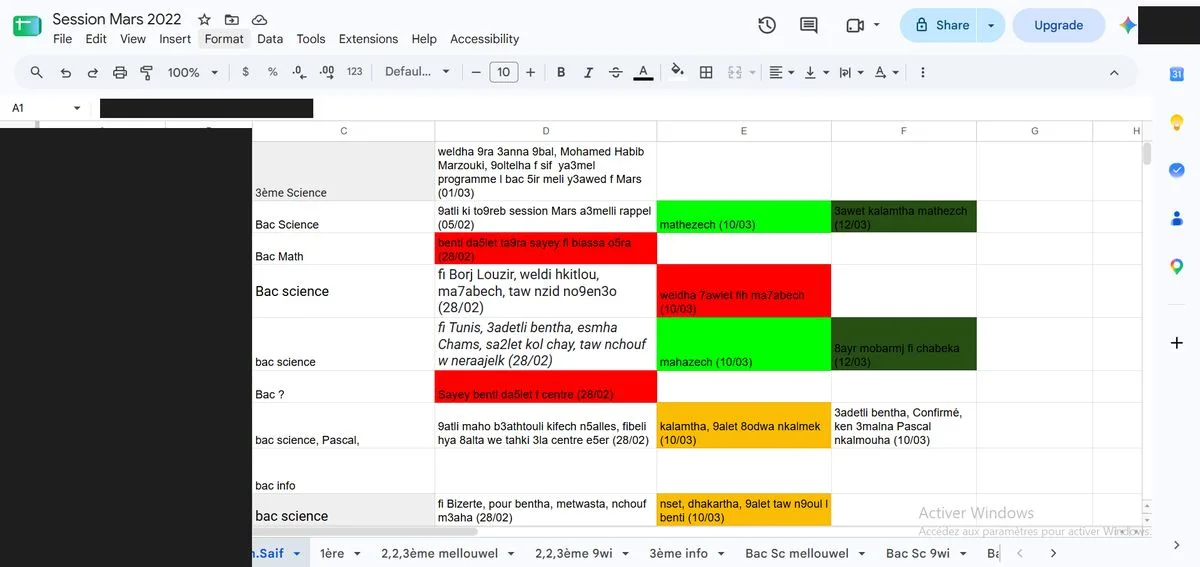
Client status and comments freeform in cell text. Nothing searchable, nothing structured. 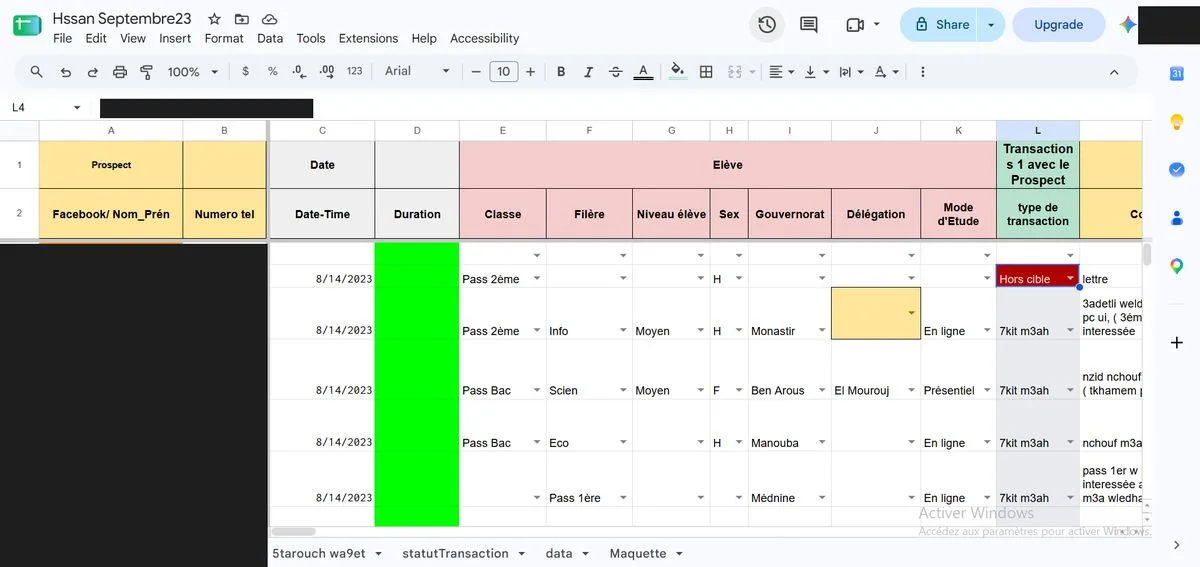
Every session lived in its own sheet: dozens of files, none linked together.
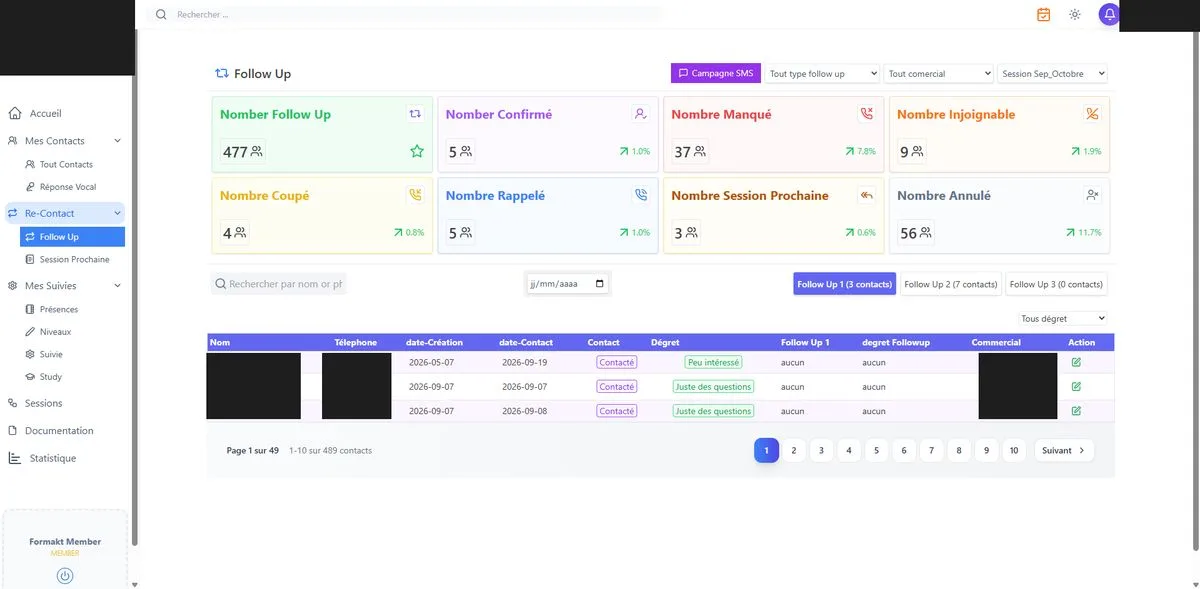
Every contact status tracked and searchable. Follow-ups queued in one click. 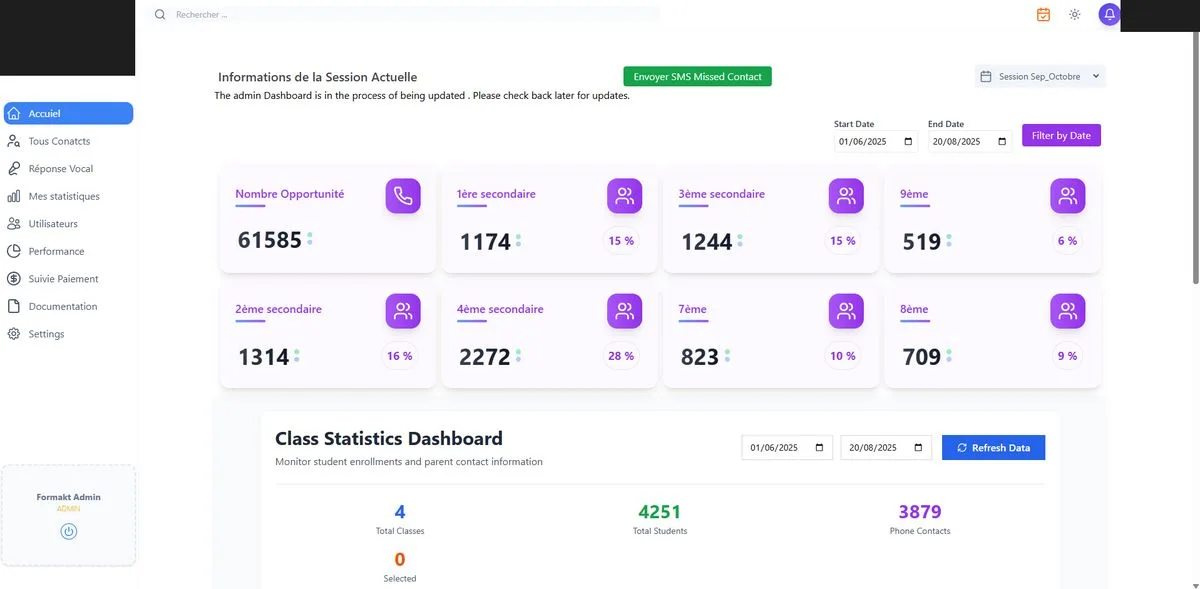
One dashboard shows exactly where every prospect stands, across the whole pipeline.
What changed, in numbers
- Revenue
+10–15%
added to yearly revenue, from systematic follow-up with past clients
- Recovered
~3%
of clients recovered with one-click automated session reminders
- Payback
£10–15k
extra per £100,000 of yearly revenue
- Data
1
searchable database in place of dozens of sheets
Follow-up means reaching back out to past clients, by message, email or call, to ask if they want to continue, upgrade or try something new. A 10–20% response rate on follow-up is a genuinely strong number: on £100,000 a year, that is an extra £10,000–15,000, purely from being able to systematically come back to people the spreadsheet made too hard to track. Add the reminder-driven recovery, people who had confirmed weeks earlier and quietly forgotten, and the pipeline stops leaking at both ends.
The client is still on the system, still adding features. Once the data is centralised, every new idea becomes cheap to test.
Three mistakes we watch for
- 1
An unreliable freelancer
If a single developer can't commit to real timelines or isn't consistently available, "two months" quietly becomes six, and six becomes indefinite.
- 2
An agency that sells strategy instead of understanding the data
A CRM is really two things: a database and an interface. The database is only as good as how deeply the team understood the actual workflow before building it. A bad early assumption, treating something as a single, unique value when the business will eventually need several, can be expensive to unwind later. We spend real time, sometimes a full week, understanding operations before writing a line of schema, because undoing a wrong assumption later costs far more than getting it right up front.
- 3
Building everything at once
We start every engagement with two or three core features, validate them, and only then commit to the rest. It protects the client's budget, makes CRM onboarding gentler for the team, and confirms early whether we are the right fit for each other.
The same CRM onboarding works for charities and estate agents
The problems here, scattered files, no follow-up, no segmentation, are not unique to education. We see the same pattern wherever people are followed over months or years.
- Charity CRM
Donors who hear back
Searching for the best CRM for charities, or the best CRM for charities UK teams use, usually means donor records live in sheets. The same follow-up that added 10–15% revenue here keeps donors giving year after year.
- CRM for charities UK
Volunteers, members, events
A not for profit CRM should segment people the way you work: last year's volunteers, lapsed members, event no-shows, each one two clicks away and with no per-seat fees.
- Estate agents
Applicants who don't go cold
The best CRM for estate agents UK branches need matches applicants to properties and reminds staff to call back. That is what the best CRM software for estate agents should do, instead of relying on a notebook or a spreadsheet tab.
Considering the same move?
Almost every business running on spreadsheets has thought about this at least once. It isn't a nice-to-have; it's foundational infrastructure for how organised an operation can become. You don't need a full build to find out if it's worth it: we can scope a small, focused system around your single highest-volume task, starting around £1,000–2,000, before committing to more.
More case studies
Frequently asked questions
We start with two or three core features so the team learns a small system first, validate them, then add follow-up calendars, reminders and payments once the core is stable. Nobody is asked to learn everything at once, and every step builds on data that is already in the CRM.
About £3,000 for core features in month one, about £6,000 total by month three, and £6,000–12,000 for a mature version at six months. A small, focused system around your highest-volume task can start at £1,000–2,000.
For a small charity with a standard donor process, a packaged charity CRM is often enough. When you track donors, volunteers, events and follow-ups your own way, the best CRM for charities is one built around those records. The same follow-up and segmentation that added 10–15% revenue here works for donor retention.
It can be. You pay for what you build, not per user, and you can start with one high-volume task for £1,000–2,000. For a not for profit CRM with many volunteers or staff, avoiding per-seat licences often decides it.
Packaged property CRMs suit agencies with a standard process. If you want applicant matching, follow-ups and reminders built around how your branch really works, a custom CRM gives you that, and a small change takes about an hour instead of a support ticket.